PREPARING ADIF FILES FOR WWBOTA UPLOAD
Some users may be experiencing difficulty uploading their ADIF log. This is almost certainly because some of the information required from a valid log is missing.
By far the easiest solution is to log with Ham2k PoLo as this uses the correct fields.
One of this issues is that Ham2K PoLo is only available for Android and iOS devices, this is of no use if you wish to log on a PC or Mac laptop for example. So, you have three options:
1. Set up your logging application of choice to use the designated ADIF fields (see the configuration instructions for your chosen logging application), or
2. Manually modify your log before uploading it to WWBOTA. For this manual modification of logs we recommend you use the tool ADIF Master.
Or the recommended and easy way:
3. If your ADIF file doesn’t have the MY_SIG_INFO and SIG_INFO file then just load it up without. You will be prompted to add your bunker reference (single bunker), then it will auto-populate the log parser for you! You will still have to add any B2B bunkers, but you will have had to have done that anyway, simply use the pen function to edit any QSO that was B2B to add their bunker details.
The video below will show a very basic log file with no SIG information.
- Upload the file
- Enter bunker reference at the prompt and press go
- Table auto-populated
- Enter any B2B references by editing the appropriate rows
- Confirm and upload, note the success pop-up message.
IF YOU DO WANT TO CONVERT YOUR FILE ....
Here is an example activation ADIF created in Ham2k PoLo.
- This is for an activation by M0ICR/P
- On 19th December 2025.
- The bunker activated was B/G-1524.
If you are having issues with your own log file, compare the structure with that shown below to see if that gives any clues. Note: Not all fields output by Ham2K PoLo and shown below are needed for the file to be valid for our WWBOTA uploader and parser. See details below for information on the minimum field, i.e. columns, required.
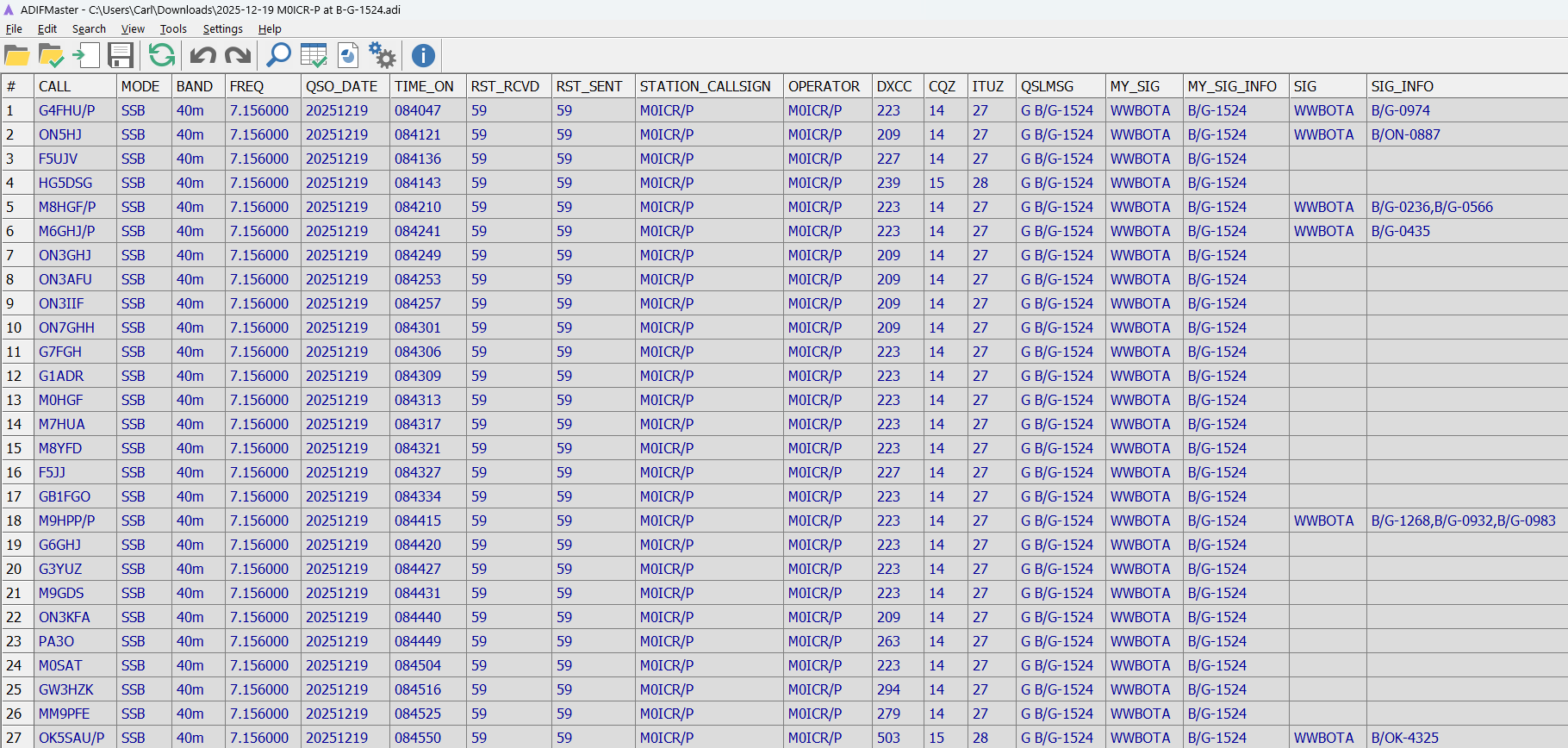
The key thing to note is the last 4 columns, most logging programs will not include these by default. SIG stands for Special Interest Group and is the standard ADIF way to represent schemes that do not have their own dedicated ADIF field. Note the follow four fields:
- MY_SIG must be WWBOTA, this indicates my reference is a WWBOTA reference
- MY_SIG_INFO this list the bunkers I activated in this case it’s a single. Note the syntax: The reference is written in full, so spaces etc. If there were additional bunkers they would be separated by a comma only, e.g. B/G-1524,B/G-0001
- SIG this is WWBOTA for any B2B QSO
- SIG_INFO this is the bunker reference for the bunkers I worked, note that like MY_SIG_INFO, if there is more than one bunker, e.g. 2-fer as in the example QSO with M8HGF/P in the table below, they are separated by a comma (only) just like MY_SIG_INFO
If the SIG description sounds complicated and you are using Ham2K PoLo then don’t worry the app takes care of it. If you are not using Ham2K PoLo you will needs to setup your logging application and enter data into it appropriately.
Other things to note:
- Band has no spaces 40m not 40 m
- Date is in format yyyyddmm
You can download this as a demo file at the link below. Enter your own callsign, try changing the bunker activated etc.

SETTING UP YOUR OWN LOGGING APPLICATION
If you are using a logging application different to Ham2K PoLo then you will need to configure it in accordance with the applications manual/instructions if you want to ensure activation and logged information goes into the correct fields for a file downloaded from it to be readable by the WWBOTA uploader and parser.
MODIFYING YOUR OWN ADIF FILE
The example below uses the same log as above and shows the bare basics required regarding ADIF field/columns for a valid WWBOTA upload and parse: